Note videos of the game will appear on my YouTube channel, Subscribe to see them. or follow me on Twitter so you get notified : https://twitter.com/AndySavage1969
I may even stream the game live on my Periscope channel : http://www.perisearch.net/user/AndySavage1969
Its that time of year again when the maddest game of football in the world takes place in Ashbourne Derbyshire. Here are the details for 2016 :
The 2016 game takes place on the 9th and 10th of February.
On Tuesday Barrie Greenwood, will be turning up the ball at 2.00pm. And on Ash Wednesday, Bill Milward will have the honor.
Ashbourne in Derbyshire is host to one of the Oldest Shrovetide football games in England and this annual event is one not to be missed.
It was first recorded in 1682, though thought to date back to the 12th Century ,various attempts were made to suppress it over the years.
It has continued unabated ever since, and by 1928 it had become so respectable that the then Prince of Wales was invited to start the game. From that year on it was known as the Royal Shrovetide Football game.
The Game is played annually on Shrove Tuesday and Ash Wednesday, and consists of two teams, one from anyone born to the North of the River Henmore, and one from people born South of the river, these are known as Upards and Downards.
The Goals are on the sites of Old mills, one at Clifton and one at Sturston, these are three miles apart.
A goal is scored by a player striking the mill wheel three times with the Ball.
360 views of the goals.
The ball may be kicked, carried or thrown, but generally proceeds in a series of hugs invisible to the spectator. The game can last for many hours, finishing well after dark.
The game starts at 2pm in the afternoon, when a specially prepared ball - larger than a football and filled with cork which weighs around 4lbs is thrown in by a visiting guest of honor. The balls used for the Shrovetide games are made by Ashbourne man John Harrison.
The hand sewn leather balls are filled with cork chippings.
The balls are a work of art and take a few weeks to paint.
The Rules
If the balls are goaled, then it will become the proud possession of the person who has goaled it. If no-one goals it, then the person that turned-up the ball gets to take it home.
The game starts in the Shawcroft Carpark (back of Waitrose supermarket), See my detailed map lower down. I have provided a detailed interactive Shrovetide map lower down in this post which will enable you to see all the key points of the playing field which 3 miles between the two goals at Sturston and Clifton.
My Videos from Ashbourne Shrovetide Football:
This is a Slow Motion video (240fps) of Mick Pepper turning up the ball at Ashbourne Shrovetide Football 2015 on Tuesday 17th February. Look at all those hands waiting to grab the ball !
Was that YOUR hand it bounced off first?
Part 1 of my video collection for Tuesday's Ashbourne Shrovetide Football 2015:
Part 2 of my video collection for Tuesday's Ashbourne Shrovetide Football 2015:
Part 3 of my video collection for Tuesday's Ashbourne Shrovetide Football 2015:
Part 4 of my video collection for Tuesday's Ashbourne Shrovetide Football 2015:
Ashbourne Royal Shrovetide Football is something that you just have to see to believe your eyes.
Here is part one of four videos I made of the game in 2012 to give you an idea of what its like :
Here is part one of six videos I made of the game in 2013 to give you an idea of what its like :
I have lots of photographs and several videos from past games that you can view :
Photographs:
Photographs from the 2008 Ashbourne Shrovetide Football game.
Photographs from the 2007 Ashbourne Shrovetide Football game.
Photographs from the 2006 Ashbourne Shrovetide Football game.
Photographs from the 2004 Ashbourne Shrovetide Football game.
Photographs from the 2002 Ashbourne Shrovetide Footbal game.
Videos :
Video footage from the 2010 Ashbourne Shrovetide Football Game.
Video footage from the 2009 Ashbourne Shrovetide Football Game.
Video footage from the 2007 Ashbourne Shrovetide Footaball game.
Extra video footage from the 2007 Ashbourne Shrovetide Football game.
Time-lapse driving video from Derby to Ashbourne.
Time-lapse driving video from Derby to Ashbourne 2012.
Location Map:
Smartphone drop pin locator for Ashbourne Shrovetide Football,
If you own a smartphone (iPhone,HTC etc) then CLICK HERE and it will launch your mapping app with a "drop pin" which I have perfectly located above the turning up plinth, If you have never been to Ashbourne then you can use this to get walking directions to where the action will be at 2pm.
On an iPhone, once the map shows up there will be a red drop pin in the middle of the screen with the title "Ashbourne Shrovetide" above it. Touch "Directions" at the bottom and then "by foot" icon at the top of the screen to get detailed walking directions to the start of the game.
The town of Ashbourne is located in Derbyshire just off the A52, see my time-lapse driving video to Ashbourne Football.
I have created an interactive map which shows all the key points in the game such as the turning up plinth where the ball is thrown, the two goals and the Henmore which is what determines if you are an Upard or a Downard, Click the link below the map for a large view of all the points of interest :
View Ashbourne Shrovetide Football game map. in a larger map
Transport
If you are travelling from Derby then you
could catch the Swift Bus from Derby Bus Station for £3.80 single/£7.50
return. This stops at Ashbourne Bus Station which is a two minute walk from the Shorecroft car park. Information on the Swift Bus Service.
Accommodation
If your looking for somewhere to stay over then there is the White Hart pub just down the road or the Station Hotel or Compton Guest House or a Travel Lodge at the other end of the town.
Thanks
Andy
Showing posts with label live. Show all posts
Showing posts with label live. Show all posts
Friday, 5 February 2016


Monday, 20 July 2015
The Periscope App on iPhone (Broadcast live video and sound to the world for free). You must try this, its amazing.
Did you watch my live video broadcast of this weekends Derby Carnival on Periscope?
111 people around the world did.
Follow me on Periscope/Twitter for more Derby live video broadcasts !
If you have never heard of Periscope then here is my review of it to see if its for you.
Periscope is a free live video broadcasting app for your Smartphone. It allows you to transmit live video and sound to the world.
People find your broadcasts either via Twitter if they follow you or via the app itself.

People viewing your live video can communicate with YOU via a chat field. you type in your short message and it pops up on the video screen. It fades away after a few seconds and
gets pushed up the screen by other peoples messages. Everyone viewing the video can see everyone elses messages.
Each persons messages are in a different colour.
You can also send your appreciation to the broadcaster by tapping on the screen, this will send Hearts floating up the screen.
On popular feeds the hearts fly up the screen like a "love firework" LOL!
How to use the Periscope app (ios version):
As a viewer :
Once you have installed it and signed in with your Twitter account you are ready to go.
Click on the World icon and then the Map button at the top and it will show you a map of the world with red dots on it showing you all the current live broadcasts.

If it has a number in the red circle, this means there are several broadcasts in that location, zoom in to see more accurate locations.
To view a broadcast simply tap on one of the dots, it will show you details at the bottom of the broadcast. Tap on it to start viewing it.

Within a few seconds it will go to fullscreen and say "Loading" with the background being a blurred view of the original view of the broadcast. The live footage will
normally start within 3 seconds. If the person has a good signal the quality of the video is amazing.

Once on this screen you can now type a message to the broadcaster.Tap the screen to send hearts.
Swipe the screen to the left and it will show you a real-time map location for the person doing the broadcast.

In this section you can also tap
"hide chat" to stop all the messages scrolling up if you just want to see the video. If you swipe this panel up you can see who else is watching the broadcast.
To get back to the normal screen simply swipe it left out the way.
To stop viewing the broadcast tap the X in the top right of the screen.
As a broadcaster:
Tap the 3rd icon at the bottom of the screen.
This will start the camera preview and allow you to type in a description of your broadcast, for instance "Playing with my Dog on the beach".
Once you tap the red "Start the Broadcast" button it will determine your location, then it will start the video broadcast and then it will
send a Tweet to your twitter feed that you are now live. If you have followers on Periscope then it will also send push notifications to their phones to say you are now live.
These take the format as follows, you get a sound and a pop up notifcation "Periscope: M4TAM is Live: Guitar in the house, playing some covers."
You then tap on the message and it will launch the Periscope app and start the live view imediatly.
To get the most out of Periscope you need to have a good phone signal, ideally this should be 4G or Wifi.
Your live broadcast will continue for ever until you stop it or loose signal for a long time.
To toggle the camera between the back and front cameras you just tap twice on the screen. When you do this there will be a second of blank video as it swaps over.
The preview thumbnail it uses seems to be based on the very first frame the camera sees, ie before you even click the start broadcast button. This is why a lot of the thumbnails are of the floor !
Worth noting that if you want your preview thumbnail to be obvious what its about.
The exposure and focus also seems to be based on the first frame.
The app is designed to be used in Portrait mode, if you turn your iPhone around 90 degrees then it means the messages will be sideways and also the viewers will
have to rotate their phone to see your footage the right way around. If someone if viewing your broadcast on a computer web browser then they would have to turn their monitor around so not ideal :)
To stop your broadcast at any time single tap at the top of the screen and a V icon will appear, tap that and a "Stop Broadcast" button will show, tap that to stop your
video transmission. At this point the app will save a local copy of your video to your camera roll on your iPhone. This is quite handy as it means you have
a record of it. this copy will not have the comments or hearts on it.
One important thing to bare in mind is that your video will be available to watch again for a maximum of 24 hours from the end of broadcast. Once
it becomes 24 hours old it will be deleted for ever.! You can watch the old broadcasts complete with all comments and hearts on the
watchonperiscope.com website.
You can not leave comments on non-live videos.
By the way there is also a web version if you don't have a smartphone. You have to install the plugin to be able to interact with the broadcasts by logging in with Twitter.
Periscope is damn addictive
I have only been using Periscope for one week and I'm totally addicted to it. You are able to share moments in peoples lives all over the world and interact with them.
Some interesting broadcasts that I have seen over the last week are :
1) A man trapped in a lift in California.
He said it was the first time he had ever used the Periscope app, oh my what a great first time!
Initially you thought yea right is he really trapped but over time you could see he really was trapped. You could hear people outside
trying to get the doors open and telling him not to press any buttons.
There were 45 people watching him, all reassuring him that he would soon be free. Lots of people telling him to keep calm and that we are all in this
together.
Eventually, after what seemed like an eternity the doors were prized apart and you could see that the lift had got stuck part way between floors.
He was able to drop down out of the lift and to freedom.
This broadcast was really gripping.
2) Balloon Chase crew.
This was a lady in Texas that was part of a chase crew. They follow the progress of a Hot air balloon in their pick up truck so that they can be there for when it lands.
This was an interesting broadcast as the balloon kept looking like it was going to touch down but then went up again.
I asked her if she had ever been in a balloon but she said no as she was scared of heights.
the balloon eventually touched down in front of a house and the crew then held onto the ropes until the air had started to release from the canopy.
3) Earthquake at Universal studios.
This was someone on the ride at Universal Studios in California. It was just like being there with them. The vehicle they were on fell down and the
set all collapsed and then lots of water flooded in from above. After this they went on to the Jaws set where a Great White Shark came out of the water and attacked the ride.
4) London Street tours.
There were several people doing this, basically people wandering around various locations in London.
One person was going around souvenir shops and showing people the kind of things you can buy.
One was a wander around Leicester Square showing the live entertainment.
One was a magic at Covent Garden.
One guy was showing you his daily commute from home to the London Underground, of course this transmission stop at the point the train went into the tunnel as there is no phone signal or WiFi in there.
5) Tornado in USA
I have seen a few people doing this. There are a lot of bad Tornado's going through the USA and Periscope allows you to see them live as they hit.
There was one on Saturday which was about to hit, it was great being able to see it live and feel the tension of being there.
6) Filming of the latest Walking Dead TV Series.
This was one of the best finds on Periscope, "Pastor Rodney" kept broadcasting live from near the sets of Walking Dead ! You were able to see them setting up scenes for the latest TV Series of Walking Dead. He was chatting to film crews.
It was so amazing to actually see the new series being filmed, This is the power of Periscope.
If YOU fancy joining the new Periscope revolution then download the free app available on iPhone and Android platforms.
You sign in with your Twitter credentials and get broadcasting or viewing.
Thanks
Andy
111 people around the world did.
Follow me on Periscope/Twitter for more Derby live video broadcasts !
 |
| My live broadcast of Derby's Carnival on Saturday. |
If you have never heard of Periscope then here is my review of it to see if its for you.
Periscope is a free live video broadcasting app for your Smartphone. It allows you to transmit live video and sound to the world.
People find your broadcasts either via Twitter if they follow you or via the app itself.
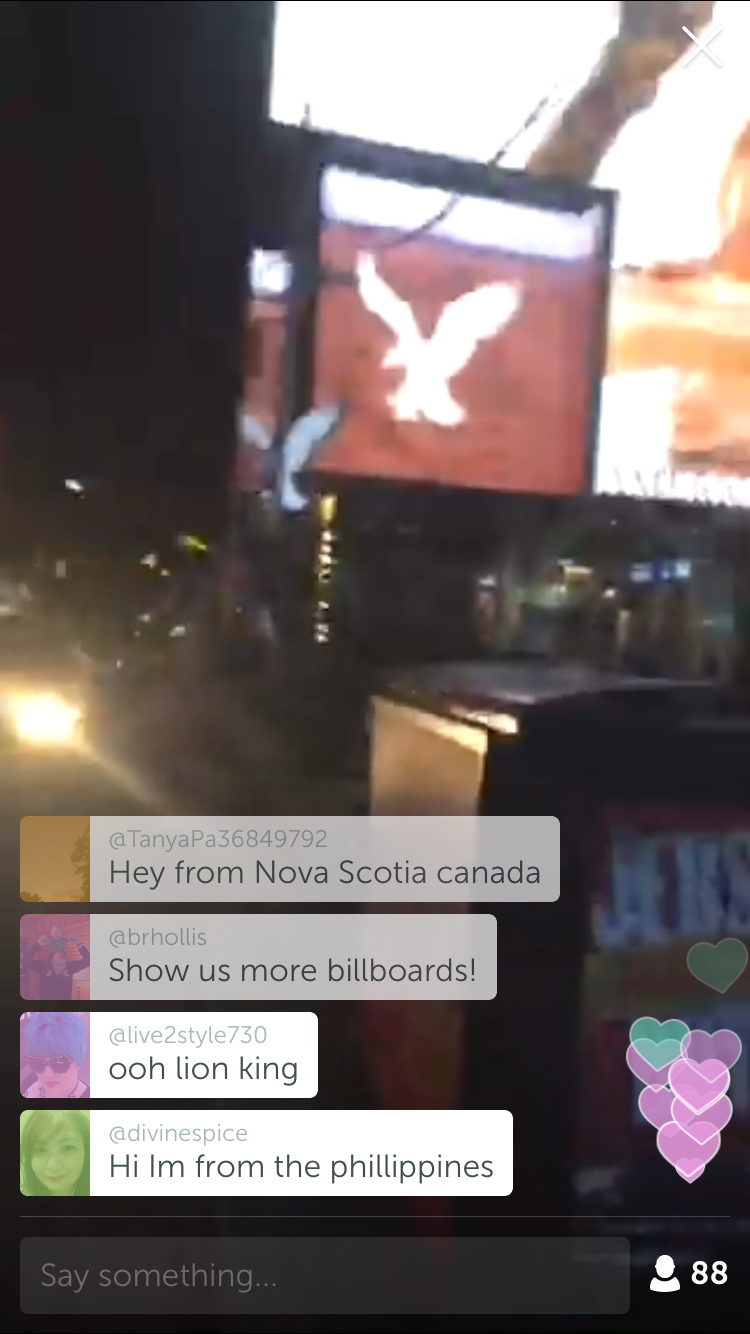
People viewing your live video can communicate with YOU via a chat field. you type in your short message and it pops up on the video screen. It fades away after a few seconds and
gets pushed up the screen by other peoples messages. Everyone viewing the video can see everyone elses messages.
Each persons messages are in a different colour.
You can also send your appreciation to the broadcaster by tapping on the screen, this will send Hearts floating up the screen.
On popular feeds the hearts fly up the screen like a "love firework" LOL!
How to use the Periscope app (ios version):
As a viewer :
Once you have installed it and signed in with your Twitter account you are ready to go.
Click on the World icon and then the Map button at the top and it will show you a map of the world with red dots on it showing you all the current live broadcasts.

If it has a number in the red circle, this means there are several broadcasts in that location, zoom in to see more accurate locations.
To view a broadcast simply tap on one of the dots, it will show you details at the bottom of the broadcast. Tap on it to start viewing it.

Within a few seconds it will go to fullscreen and say "Loading" with the background being a blurred view of the original view of the broadcast. The live footage will
normally start within 3 seconds. If the person has a good signal the quality of the video is amazing.

Once on this screen you can now type a message to the broadcaster.Tap the screen to send hearts.
Swipe the screen to the left and it will show you a real-time map location for the person doing the broadcast.

In this section you can also tap
"hide chat" to stop all the messages scrolling up if you just want to see the video. If you swipe this panel up you can see who else is watching the broadcast.
To get back to the normal screen simply swipe it left out the way.
To stop viewing the broadcast tap the X in the top right of the screen.
As a broadcaster:
Tap the 3rd icon at the bottom of the screen.
This will start the camera preview and allow you to type in a description of your broadcast, for instance "Playing with my Dog on the beach".
Once you tap the red "Start the Broadcast" button it will determine your location, then it will start the video broadcast and then it will
send a Tweet to your twitter feed that you are now live. If you have followers on Periscope then it will also send push notifications to their phones to say you are now live.
These take the format as follows, you get a sound and a pop up notifcation "Periscope: M4TAM is Live: Guitar in the house, playing some covers."
You then tap on the message and it will launch the Periscope app and start the live view imediatly.
To get the most out of Periscope you need to have a good phone signal, ideally this should be 4G or Wifi.
Your live broadcast will continue for ever until you stop it or loose signal for a long time.
To toggle the camera between the back and front cameras you just tap twice on the screen. When you do this there will be a second of blank video as it swaps over.
The preview thumbnail it uses seems to be based on the very first frame the camera sees, ie before you even click the start broadcast button. This is why a lot of the thumbnails are of the floor !
Worth noting that if you want your preview thumbnail to be obvious what its about.
The exposure and focus also seems to be based on the first frame.
The app is designed to be used in Portrait mode, if you turn your iPhone around 90 degrees then it means the messages will be sideways and also the viewers will
have to rotate their phone to see your footage the right way around. If someone if viewing your broadcast on a computer web browser then they would have to turn their monitor around so not ideal :)
To stop your broadcast at any time single tap at the top of the screen and a V icon will appear, tap that and a "Stop Broadcast" button will show, tap that to stop your
video transmission. At this point the app will save a local copy of your video to your camera roll on your iPhone. This is quite handy as it means you have
a record of it. this copy will not have the comments or hearts on it.
One important thing to bare in mind is that your video will be available to watch again for a maximum of 24 hours from the end of broadcast. Once
it becomes 24 hours old it will be deleted for ever.! You can watch the old broadcasts complete with all comments and hearts on the
watchonperiscope.com website.
You can not leave comments on non-live videos.
By the way there is also a web version if you don't have a smartphone. You have to install the plugin to be able to interact with the broadcasts by logging in with Twitter.
Periscope is damn addictive
I have only been using Periscope for one week and I'm totally addicted to it. You are able to share moments in peoples lives all over the world and interact with them.
Some interesting broadcasts that I have seen over the last week are :
1) A man trapped in a lift in California.
He said it was the first time he had ever used the Periscope app, oh my what a great first time!
Initially you thought yea right is he really trapped but over time you could see he really was trapped. You could hear people outside
trying to get the doors open and telling him not to press any buttons.
There were 45 people watching him, all reassuring him that he would soon be free. Lots of people telling him to keep calm and that we are all in this
together.
Eventually, after what seemed like an eternity the doors were prized apart and you could see that the lift had got stuck part way between floors.
He was able to drop down out of the lift and to freedom.
This broadcast was really gripping.
2) Balloon Chase crew.
This was a lady in Texas that was part of a chase crew. They follow the progress of a Hot air balloon in their pick up truck so that they can be there for when it lands.
This was an interesting broadcast as the balloon kept looking like it was going to touch down but then went up again.
I asked her if she had ever been in a balloon but she said no as she was scared of heights.
the balloon eventually touched down in front of a house and the crew then held onto the ropes until the air had started to release from the canopy.
3) Earthquake at Universal studios.
This was someone on the ride at Universal Studios in California. It was just like being there with them. The vehicle they were on fell down and the
set all collapsed and then lots of water flooded in from above. After this they went on to the Jaws set where a Great White Shark came out of the water and attacked the ride.
4) London Street tours.
There were several people doing this, basically people wandering around various locations in London.
One person was going around souvenir shops and showing people the kind of things you can buy.
One was a wander around Leicester Square showing the live entertainment.
One was a magic at Covent Garden.
One guy was showing you his daily commute from home to the London Underground, of course this transmission stop at the point the train went into the tunnel as there is no phone signal or WiFi in there.
5) Tornado in USA
I have seen a few people doing this. There are a lot of bad Tornado's going through the USA and Periscope allows you to see them live as they hit.
There was one on Saturday which was about to hit, it was great being able to see it live and feel the tension of being there.
6) Filming of the latest Walking Dead TV Series.
This was one of the best finds on Periscope, "Pastor Rodney" kept broadcasting live from near the sets of Walking Dead ! You were able to see them setting up scenes for the latest TV Series of Walking Dead. He was chatting to film crews.
It was so amazing to actually see the new series being filmed, This is the power of Periscope.
If YOU fancy joining the new Periscope revolution then download the free app available on iPhone and Android platforms.
You sign in with your Twitter credentials and get broadcasting or viewing.
Thanks
Andy
Saturday, 2 November 2013
"The Modest" band play Derby tonight in Mackworth.
If you were at the 2013 CAMRA Derby Winter Beer Festival back in Feb this year then you may have seen this great band perform on Thursday 21st February.
The Modest play songs by The small Faces, The Who, The Action, The Kinks, Dexy's, Northern Soul, Motown, Stax etc Really good they are too.
Well tonight Saturday 2nd November at 9pm you will be able to see them play again at "The Woodpecker", 1 Woodford Road, Mackworth, Derby.
Videos of The Modest :
If you can't make this gig then there are two other local gigs in Derby before the end of the year. They often perform at other pubs in Derbyshire and Burton too, Check out their live date page.
Here are their two other Derby gigs this year :
Friday 8th November 9pm
The Horse and Groom, 48 Elms Street, Derby
Friday 22nd November 9pm
Roundhouse pub, London Road, Alvaston, Derby
More information :
The Modest website.
Facebook page :
The Woodpecker, Mackworth, Derby.
Follow me on Twitter :
Andy Savage from Derby.
Thanks
Andy
The Modest play songs by The small Faces, The Who, The Action, The Kinks, Dexy's, Northern Soul, Motown, Stax etc Really good they are too.
Well tonight Saturday 2nd November at 9pm you will be able to see them play again at "The Woodpecker", 1 Woodford Road, Mackworth, Derby.
Videos of The Modest :
If you can't make this gig then there are two other local gigs in Derby before the end of the year. They often perform at other pubs in Derbyshire and Burton too, Check out their live date page.
Here are their two other Derby gigs this year :
Friday 8th November 9pm
The Horse and Groom, 48 Elms Street, Derby
Friday 22nd November 9pm
Roundhouse pub, London Road, Alvaston, Derby
More information :
The Modest website.
Facebook page :
The Woodpecker, Mackworth, Derby.
Follow me on Twitter :
Andy Savage from Derby.
Thanks
Andy
Friday, 22 March 2013
Snow again in Derby !, Just when you thought spring was here.
Even though its now officially spring, another lot of snow has arrived in Derby. It started about 11pm Thursday and is quite heavy now.
Using my Derby and Derbyshire webcams you can see just how much snow has dropped in the night.
Here is nesting ledge of the Derby Peregrine Falcons, would you want to sit in that !
If the snow stays around then we may be able to go sledging, have a look at my Derby Sledging Guide for details.
Its meant to be snowing all Friday night and well into Saturday too so sounds like there is going to be a lot of snow in Derby for the weekend.
Confused Daffodils in my garden in Derby :

Andy
Using my Derby and Derbyshire webcams you can see just how much snow has dropped in the night.
Here is nesting ledge of the Derby Peregrine Falcons, would you want to sit in that !
 |
| Derby Peregrine nest Webcam showing the snow. |
If the snow stays around then we may be able to go sledging, have a look at my Derby Sledging Guide for details.
Its meant to be snowing all Friday night and well into Saturday too so sounds like there is going to be a lot of snow in Derby for the weekend.
Confused Daffodils in my garden in Derby :

Andy
Monday, 10 September 2012
Watch the entire 2012 Paralympic Games Closing Ceremony now.
Update for October - The DVD and Blu-ray releases are out now :
If you missed last nights 2012 Paralympic Games Closing Ceremony, don't worry as you can watch it now on the 4oD service. You will need broadband of course.
You have to watch 6 small adverts before you can start to watch the Paralympic Games Closing Ceremony.
Each advert is around 20 to 30 seconds long. There are 11 other sections of adverts throughout the program which you also have to watch (in sets of 5 adverts), these will interrupt if you try and fast forward too ! Very annoying but it is free so I guess you can't complain.
You can re-live all those amazing moments from the Olympic games on DVD and BluRay from Amazon :
Watch it here
Watch the entire Paralympic Games Closing Ceremony on the 4oD service.
That's the all 3 Hours 41 minutes of it including the amzing performance by Coldplay.
DVD of the 2012 Paralympic Games?
The question that has to be asked here is will the opening and closing ceremonies of the 2012 Paralympic Games be made available on DVD? These were not broadcast by the BBC so I don't think they will make it onto the London 2012 Olympic Games DVD.
DVD.
Perhaps Channel 4 will have their own DVD of this?
We should start a campaign to get the Paralympic opening and closing ceremony released on DVD.
You may be interested in my other blog post on the Opening Ceremony of the Olympic Games.
Hope you found this of interest.
Andy
If you missed last nights 2012 Paralympic Games Closing Ceremony, don't worry as you can watch it now on the 4oD service. You will need broadband of course.
 |
| The 2012 Paralympic Games Closing Ceremony |
You have to watch 6 small adverts before you can start to watch the Paralympic Games Closing Ceremony.
Each advert is around 20 to 30 seconds long. There are 11 other sections of adverts throughout the program which you also have to watch (in sets of 5 adverts), these will interrupt if you try and fast forward too ! Very annoying but it is free so I guess you can't complain.
You can re-live all those amazing moments from the Olympic games on DVD and BluRay from Amazon :
Watch it here
Watch the entire Paralympic Games Closing Ceremony on the 4oD service.
That's the all 3 Hours 41 minutes of it including the amzing performance by Coldplay.
 |
| The 2012 Paralympic Games Closing Ceremony |
 |
| Colplay performing at the 2012 Paralympic Games Closing Ceremony |
 |
| The 2012 Paralympic Games Closing Ceremony |
The question that has to be asked here is will the opening and closing ceremonies of the 2012 Paralympic Games be made available on DVD? These were not broadcast by the BBC so I don't think they will make it onto the London 2012 Olympic Games
DVD.Perhaps Channel 4 will have their own DVD of this?
We should start a campaign to get the Paralympic opening and closing ceremony released on DVD.
You may be interested in my other blog post on the Opening Ceremony of the Olympic Games.
Hope you found this of interest.
Andy
Wednesday, 1 December 2010
More webcams to keep an eye on that snow, Staffordshire webcams now live
At the moment its snowing in Derby and has been all night, Not seen this much snow in years.
People seem to like my Derbyshire webcams page during these times as it allows you to see for yourself if its actually snowing right now rather than trusting a weatherman to tell you!
So I have started to create a section for Staffordshire Webcams as this is the next county to the south west of Derbyshire so you can see how bad the snow is effecting them.
One of the webcams I have added to this page is provided by www.leekonline.co.uk and is extreamly good as it allows many viewing options including almost live video streaming so you can actually see the snow coming down.
Here is a screen grab of how the snow was looking this morning in Leek:
The Snow in Leek on the 1st December 2010 :

If you know of any webcams in Staffordshire that I can add to my page then please contact me via my website or post a comment to this blog post and I will add it to the page so others can enjoy it.
I'm sure there must be lots of webcams in Staffordshire but quite often they are not easy to find.
In time I will probably be creating a few other webcam pages for the other surrounding counties of Nottinghamshire, Yorkshire, Cheshire, Leicestershire, Lancashire.
I wonder how long this snow is going to stop around for. Normally when it snows the temperature is much warmer than this time so it does not get chance to settle but this stuff has settled and there is so much of it.
If you want to make the most of the snow then check out my Derby Sledging Guide.
Thanks
Andy
People seem to like my Derbyshire webcams page during these times as it allows you to see for yourself if its actually snowing right now rather than trusting a weatherman to tell you!
So I have started to create a section for Staffordshire Webcams as this is the next county to the south west of Derbyshire so you can see how bad the snow is effecting them.
One of the webcams I have added to this page is provided by www.leekonline.co.uk and is extreamly good as it allows many viewing options including almost live video streaming so you can actually see the snow coming down.
Here is a screen grab of how the snow was looking this morning in Leek:
The Snow in Leek on the 1st December 2010 :
If you know of any webcams in Staffordshire that I can add to my page then please contact me via my website or post a comment to this blog post and I will add it to the page so others can enjoy it.
I'm sure there must be lots of webcams in Staffordshire but quite often they are not easy to find.
In time I will probably be creating a few other webcam pages for the other surrounding counties of Nottinghamshire, Yorkshire, Cheshire, Leicestershire, Lancashire.
I wonder how long this snow is going to stop around for. Normally when it snows the temperature is much warmer than this time so it does not get chance to settle but this stuff has settled and there is so much of it.
If you want to make the most of the snow then check out my Derby Sledging Guide.
Thanks
Andy
Friday, 28 May 2010
Did you know you can see live bands at the Flower Pot, Derby. Such as Midge Ure last week.

Last Friday, 21st of May we went to see Midge Ure play a solo acoustic set at the Flower Pot, Derby.
This was the first time I had been to a gig at this venue. I'm sure you know who Midge Ure is, if not then shame on you. Watch THIS video to see if it reminds you!
The Flower Pot has lots of live bands on through out the year.
For more info please visit there website :
http://www.rawpromo.co.uk/
Tickets also on here :
http://www.ents24.com/web/venue/Derby/Flower-Pot-2111.html
You can also get tickets direct from The Flower Pot, so why not go and have a beer in the beer garden at the same time.
The Flower Pot pub is located at 25 King Street, Derby,Derbyshire, DE1 3DZ.
Phone 01332 204955
View The Flower Pot Pub, Derby in a larger map
Have a look at my Google Streetview image of the Gig poster wall of the Flower Pot. As you can see Google Streetview must have driven past the Flower Pot in March 2008.
There is a rather handy multi-storey car park just a few feet away from this venue on Chapel Street which is open 24 hours a day and has 524 spaces so you should have no problem parking here. I have marked this car park in red in my map above. The Flower Pot pub is marked in Green.
More info on Midge Ure:
http://www.midgeure.com/
Midge Ure last played a gig in Derby on 29th April 2005 in the Darwin Suite of Derby Assembly Rooms.
If you are a fan of 80s music then perhaps you were there at "The Hitmakers Tour" on November 15th 2006 when ABC, Howard Jones and Toyah Wilcox played in the Great Hall.
Hope you found this blogpost of interest.
Cheers
Andy
Thursday, 15 April 2010
A new webcam for Derby. Friary Street and the inner ring road. Great live view.
At last we now have a brand new webcam for Derby. This one looking over Friary Street.

This new view over the city is kindly provided by Smith Partnership Solicitors and gives you a great view over Friary Street where Derby inner ring road is being constructed at the moment.
If you want to view the live webcam feed now click this link here:
Live webcam view of Friary Street, Derby.
Here is a map showing the area covered by this webcam.
View Friary Street webcam. in a larger map
This is one of many live webcams for Derby and Derbyshire which can be found on my webcams page.
Is anyone else out there in Derby willing to put a webcam up?, just think how many people out there that have broadband internet and a great view, all they need is a IP Webcam and you can share your view with the world. Please get in touch if you would like to add YOUR Derby webcam to my webcams page.
All you need is a ip webcam and you can transmit your view to the world.
Thanks
Andy

This new view over the city is kindly provided by Smith Partnership Solicitors and gives you a great view over Friary Street where Derby inner ring road is being constructed at the moment.
If you want to view the live webcam feed now click this link here:
Live webcam view of Friary Street, Derby.
Here is a map showing the area covered by this webcam.
View Friary Street webcam. in a larger map
This is one of many live webcams for Derby and Derbyshire which can be found on my webcams page.
Is anyone else out there in Derby willing to put a webcam up?, just think how many people out there that have broadband internet and a great view, all they need is a IP Webcam and you can share your view with the world. Please get in touch if you would like to add YOUR Derby webcam to my webcams page.
All you need is a ip webcam and you can transmit your view to the world.
Thanks
Andy
Tuesday, 22 December 2009
Is it snowing right now in Derbyshire, check out the live webcams to see.

This image is from one of the many live webcams we have in Derbyshire.
This webcam is located at Grindleford Village in the Peak District.
As we fast approach Christmas day you may be wondering if its going to snow on the big day. Well using the many live Derbyshire webcams you can see what the weather is like around the County without having to venture out.
If you want to see if its snowing on the day then check out my..
Derby and Derbyshire Webcams page.
I also list lots of other webcams at the bottom of the webcam page.
Here are a few other webcams in the UK
so you can see where it is currently snowing :
UK Map with many webcams on it, simply click on a webcam to view it:
A full UK map showing webcams.
Snow cams:
Castle Street, Dornoch, Sutherland, Northern Scotland.
Swaledale, North Yorkshire.
Andy
Tuesday, 10 November 2009
Gadget Show, Great show for latest hardware reviews. Watch online.

If you have not seen The Gadget show on Five TV before and are into technology and hardware reviews then you can now watch this show live online using Five Tv on demand service which is free to use.
The consumer technology show is hosted by Jason Bradbury, Jon Bentley, Suzi Perry and Ortis Deley.
Watch the latest episode here : Gadget Show ondemand.
The previous 14 shows are also on there ready to watch when you want for free.
You can play them fullscreen too just like the BBC iPlayer service.
n.b. You have to sit through a 1 minute advert at the start of the show which you can not fast forward through.
The Gadget show is as good as the BBCs Click program.
Also you can win a massive set of prizes on this show, and I really do mean a massive set of prizes.
Update 19th August 2011:
Not sure if today's show was in Derby but the address you have to post your competition answer to is in Derby. Perhaps the house where all the gadgets were that Brian Belo managed to name was in Derby?
The Question was...
Morocco is in which continent?
a) South America
b) Europe
c) Africa
The Gadget show is one of my favourite programs, always interesting stuff to see.
Thanks
Andy
Tuesday, 25 August 2009
Webcams in Derby and Derbyshire, new local webcams now online

I maintain a list of all the current webcams I have found that feature content from within the city of Derby
and the County of Derbyshire.
I have just updated my webcam list to include some new ones that you may not have seen before.
See my local webcams here :
Webcams in Derby and Derbyshire
For each webcam I have listed what type of webcam footage it offers and if you need to install a Browser plug-in to view them.
The most popular webcam in Derby is of course the Peregrine Falcons on Derby Cathedral, this webcam has been in place since 2006
and attracts online visitors from around the world and is extremely popular.
The City Derby needs some more webcams, can you help by providing a webcam stream for the city?
We only have 2 webcams in Derby, that's very poor ! We can do better than that
Just think of how many people out there in Derby have permanent broadband connections and a computer that is "always on"
and have a nice view out of their window.
Also lots of businesses around Derby that could have a webcam to generate publicity for their company, How about a pub cam.
Its so easy to setup a webcam these days it would be great if we could put Derby on the "webcam map".
In recent years it has become possible to buy what is known as an IP Webcam which is the simplest method of getting a webcam
online. All you have to do with an IP Webcam is connect it directly (via Ethernet cable) or wifi to your Broadband Router, it
has its own web server built in. you just configure the camera via a webpage and thats it ready to go.
I will be posting full information on how to set one of these up in a future post so watch this space.
In the meantime you can follow my instructions using some free software to get your Derby webcam online.
I have added several new Derbyshire webcams that may be of interest, these are.
1) Mercia Marina in Willington, Derbyshire looking out over all the Narrow boats moored at this new marina on the road between Findern and Willington.
2) Quarnford in Buxton, Derbyshire located on the highest village shop in Britain!
3) Monsal Dale, Derbyshire looking down the Dale towards Monsal Head and the River Wye.
4) Ecclesbourne Valley Railway, Wirksworth, Derbyshire. A choice of 3 webcams to look at!
5) Newhall near Swadlincote, Derbyshire. Part of a weather station website.
6) Ram FM, Iron Gate, Derby. This offers a view looking down onto Friar Gate from the Ram FM studios.
This brings the total webcams in Derbyshire to 17, come on lets see if we can get more online for the County.
If YOU know of any webcams in Derby or Derbyshire that I have missed or one that you have just set up and want promoting then post a comment
to this and I will add it to my list for you.
See my current webcams list here :
Webcams in Derby and Derbyshire
Thanks
Andy
www.derbyphotos.co.uk
Subscribe to:
Posts (Atom)


